
Future or Friction: Cognition’s video player feature


Welcome to Future or Friction! This is the first (of hopefully many) pieces where we’ll break down the UX patterns that are being used in the most popular and innovative AI products and discuss whether they’re the future, or they’re friction.
Today, we’re diving into Devin—the AI software engineer putting our jobs at risk—and their video player feature that lets you scrub through its actions. We spoke with Sara Xiang, the Cognition PM who pioneered this feature to get an inside look on how one of the hottest AI companies is thinking about agent design.
What is Devin?
Cognition, now valued at $2 billion, is on its way to reinvent the way software is made. They are building Devin, an AI-powered coding assistant for developers and software engineers. While it initially went viral for its benchmarked performance of being able to resolve 14% of open-source issues, we’ve since seen many more of its capabilities — fine-tuning LLMs, completing Upwork tasks, and more.
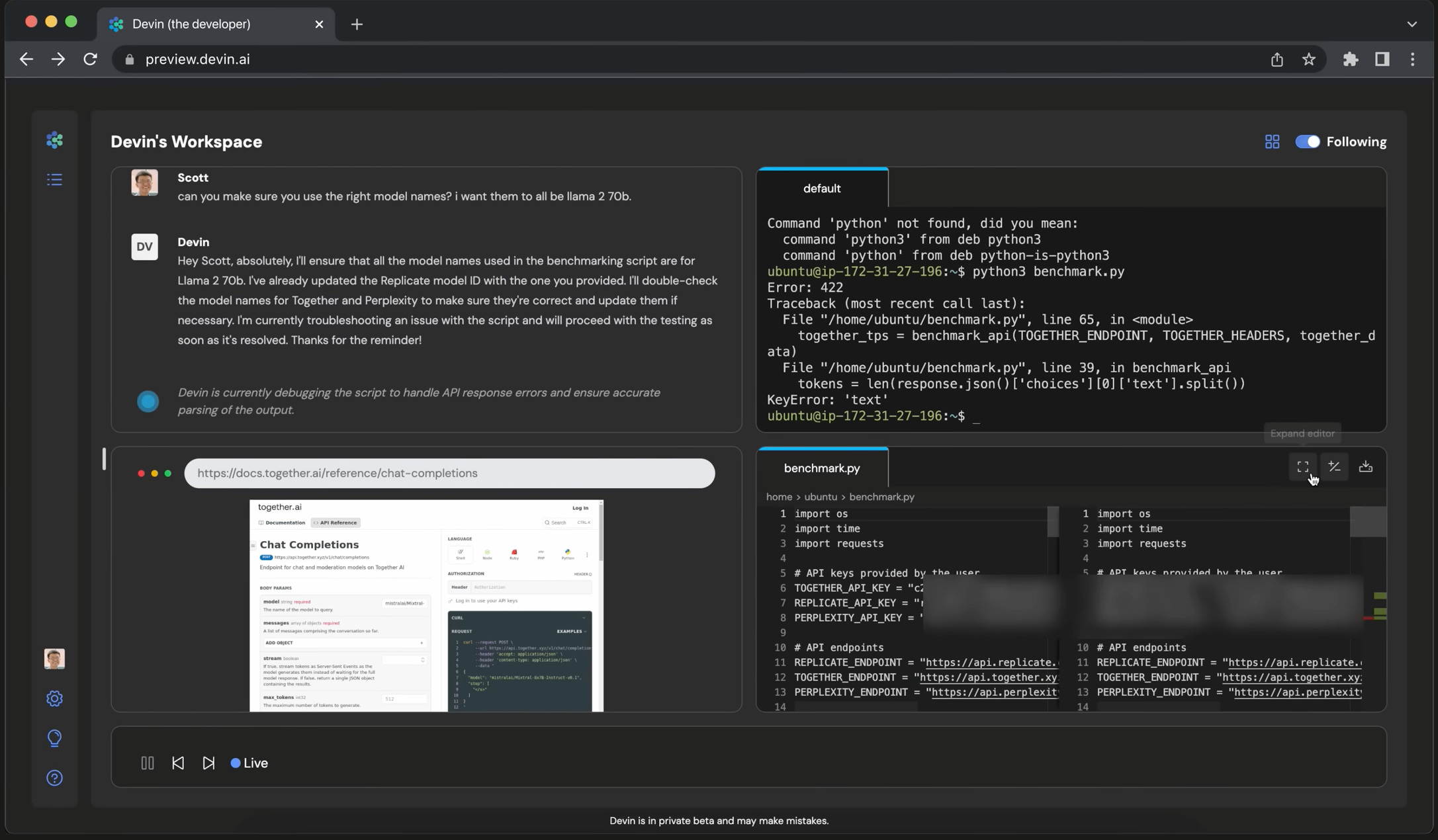
As an autonomous AI agent, Devin is able to process large codebases and make complex changes behind the scenes while we follow along through the visual user interface. There are four main components to the Devin UI: the chat interface, terminal, code editor, and browser. Users can directly interact with Devin through the chat, where they can assign tasks or ask questions about the codebase. Then, to complete the requested task, Devin first plans the high-level steps that it will take and then switches between the terminal, browser, and code editor within its workspace as needed to carry out the task.
About the video player feature
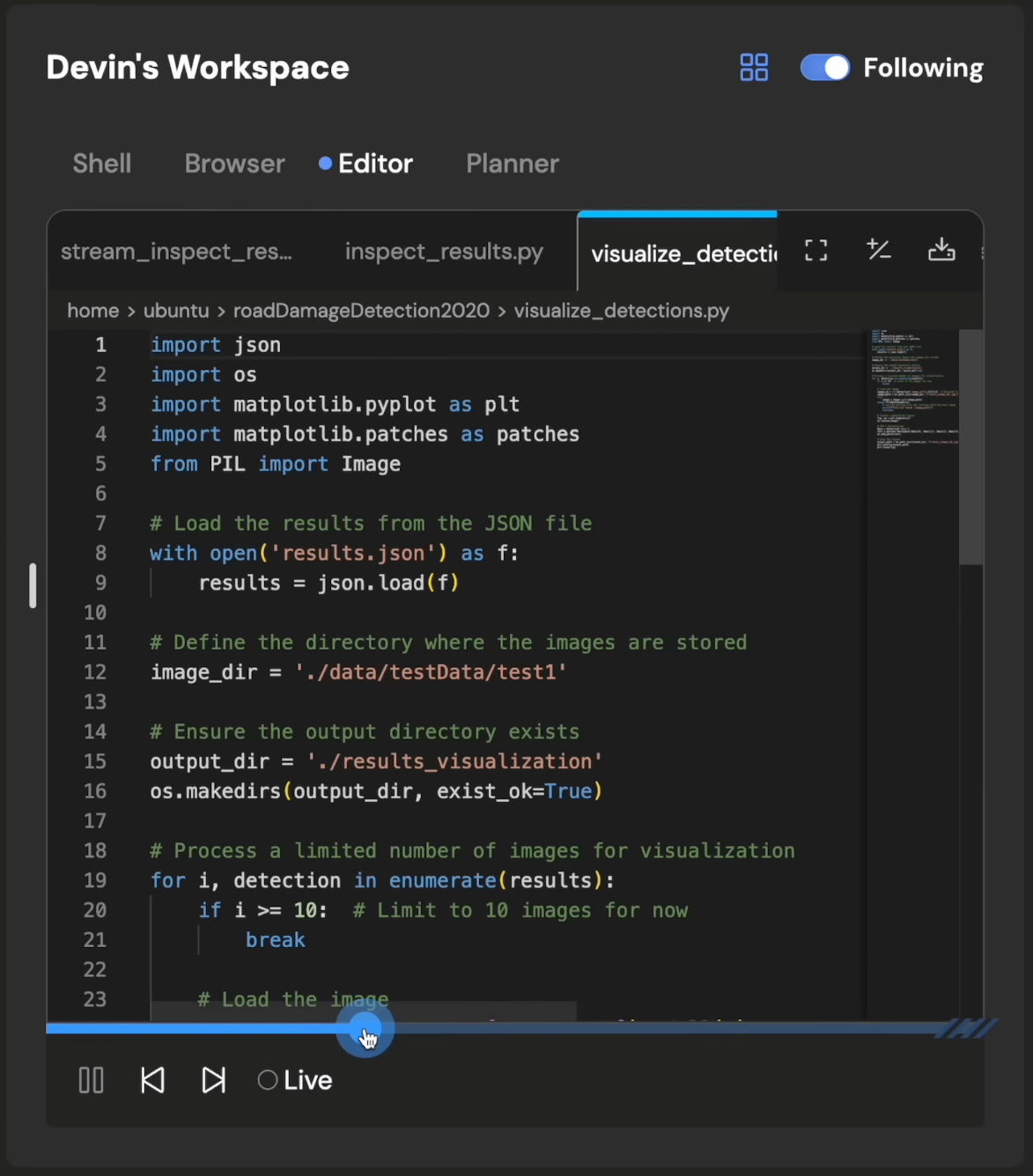
While there are many interesting design choices within the interface, we were particularly fascinated by the video player feature: as Devin completes a task, the video player shows every action that it is taking, whether that’s changing a line of code, issuing a terminal command, or browsing the web. Each action Devin takes is clearly demarcated based on its high-level plan, and as users, we’re given the ability to easily step through each action using fast-forward or rewind buttons.
Future or friction?
In one sentence, we believe that the video player is the future. But it’s more about signaling trust in Devin’s actions than creating a way for it to be carefully monitored.
Why is this the case? Like any product thinking exercise, let’s think about the types of people who would use Devin and how the video player factors into their experience.
On one hand, there are non-technical users who want to use Devin to spin up simple websites or applications. For these people, the video player feature might be interesting for watching the development process happen, but they lack the background to really understand what’s going on or taking any follow-up actions. What’s most important to these users is Devin’s finished product, rather than all the steps that were taken in between.
On the other hand, we have technical users that might ask Devin to complete contained tasks within larger code repositories. For these users, the video player offers the observability necessary for building trust in any autonomous agent. It’s nice to know that we can carefully track every step of what it's doing. However, they probably won’t actually step through it. Think of Devin like an intern — if you’re managing an intern, you wouldn’t need or want to know every step they took because you can just review their code. If you do want to see what Devin got up to, Devin’s plan in the chat history should be more than enough; you don’t need to go through every single action it took.
Behind the scenes
We spoke with Sara Xiang, the Cognition PM who led the development of the video player feature, to hear about how the feature came to fruition and how she thinks about product design and development at Cognition.
Sara told us that, in its earliest form, the video player was an internal observability tool allowing the Cognition team to track the behavior of Devin and what it was doing at each moment. They could see the screenshots of what Devin was doing and the language model outputs at a single moment of time, unable to step back and forth. However, drawing inspiration from YouTube and other video players, Sara extended this feature to work for users — enabling easy observability across Devin’s entire course of action.
More broadly, she cited the experience of interacting with a human coworker as the source of many design decisions. For instance, users can “take over” Devin's computer, akin to tapping a coworker on the shoulder to make a quick edit or suggestion directly in their workspace. They also don’t stream the response like most AI chatbots, but rather show a “Devin is typing…” placeholder, waiting for the message to fully generate before sending it to the user — mimicking how Slack conversations with colleagues happen in real life. These small affordances and design choices are part of a larger pattern of making agents more “human”-like in their behaviors, and we’re curious to see how future AI assistants adopt this pattern.
Looking forward
We’re bullish. We think that video players can usher in the necessary trust and observability to make agents successful.
So what’s next? While video players are the foundation of agent observability, their granularity (viewing every single step the agent takes) also creates the need for more automated analysis — maybe we’ll see the development of AI agents that are tasked with monitoring and auditing what other AI agents do. Video players might not just be for humans, but AI too.
And finally, for those building agents, there’s a lot to learn from Devin beyond just the video player. A couple takeaways to sit on: 1) internal observability tools can be made into helpful user-facing features, and 2) the current modes of human-to-human interaction can be a rich source of design inspiration.
Nice
Love the insights here - especially incorporating real notes from the builders themselves!